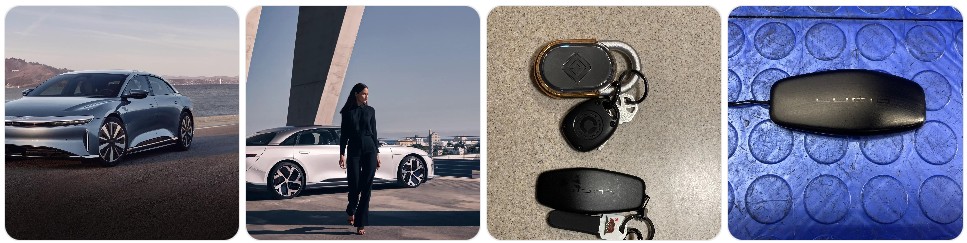
If your Lucid key fob is showing weak range, unlocking inconsistently, or triggering a low-battery message, the fix is often simple: replace the small coin-cell battery inside the fob. The exact battery depends on the Lucid model and key style, with many Lucid Air owners using a CR2032 and the Lucid Gravity using a CR2450. This guide walks through what battery a Lucid key fob uses, how to choose the right replacement, how to replace it safely, common Lucid key fob problems after a battery swap, and when it makes more sense to replace the entire fob instead. If you also want model-specific 12V battery advice for the brand, see Lucid.
Buy Key Fob Battery Replacement for Lucid
When buying a Lucid key fob battery replacement, the most important thing is matching the exact coin-cell size used by your specific Lucid fob. For many Lucid Air key fobs, the replacement battery is commonly a CR2032 3V lithium coin cell. For the Lucid Gravity, the key fob battery is commonly a CR2450 3V lithium coin cell. Because Lucid uses premium vehicle electronics and model-specific hardware, it is always smart to open the fob and verify the number printed on the old battery before ordering. If you want to compare options first, you can browse Lucid key fob battery replacements, or go directly to CR2032 replacements for Lucid Air key fobs and CR2450 replacements for Lucid Gravity key fobs.
- CR2032 for many Lucid Air key fobs: This is the battery many Lucid Air owners keep on hand because it is compact, easy to find, and commonly associated with Air key fobs. A simple way to compare options is to look through CR2032 batteries for Lucid Air remotes. Typical price: about $5 to $12 for a multi-pack.
- CR2450 for Lucid Gravity key fobs: The Gravity key fob uses a larger coin battery than many owners expect, so it is worth checking fit before closing the case. If you want a ready-to-order option, compare CR2450 batteries for Lucid Gravity key fobs. Typical price: about $6 to $14 for a multi-pack.
- Name-brand lithium replacements: For a premium EV like Lucid, many owners prefer name-brand coin cells for better consistency and storage life. Good starting points include Panasonic CR2032 options, Energizer CR2032 options, and CR2450 lithium coin cells. Typical price: about $6 to $16 depending on brand and pack size.
- Battery plus protective accessories: Some Lucid owners buy spare coin batteries together with a signal-blocking pouch or replacement shell, especially if the fob sees heavy daily use. You can compare Lucid key fob accessories and battery-related items. Typical price: about $10 to $30 depending on what is included.

Duracell 2032 Lithium Battery, 9 Count, AirTag & Key Fob, CR2032 3V Cell

Car Key Battery for Lucid Air CR2032 3V Remote Batteries Pack of 2

Energizer CR2032 Batteries (10 Pack), 3V Lithium Coin Batteries
Lucid Key Fob Battery Replacement by Model
- Lucid Air Pure key fob battery replacement: Many Air Pure owners look for a CR2032 replacement battery. Before ordering, open the fob and confirm the battery number printed inside, then compare Lucid Air Pure key fob battery options.
- Lucid Air Touring key fob battery replacement: The Touring typically follows the same Lucid Air key fob battery pattern as other Air trims, with many owners using CR2032. The safest move is still to match the existing battery exactly.
- Lucid Air Grand Touring key fob battery replacement: If your Grand Touring starts showing low-fob warnings or reduced unlock range, battery replacement is usually the first thing to try. Search Lucid Air Grand Touring battery options if you want trim-related listings.
- Lucid Air Sapphire key fob battery replacement: The Sapphire shares the premium Lucid smart-key approach, so battery fit and clean contact seating matter. Use the battery number inside the fob, not assumptions based only on trim name.
- Lucid Gravity key fob battery replacement: Lucid Gravity owners should pay close attention to battery size because this key fob commonly uses a CR2450 rather than the smaller CR2032 associated with many Air fobs. If you want to compare options before opening the remote, browse Lucid Gravity key fob battery options.
To choose the right replacement key fob battery for Lucid, start with the exact battery code inside your current fob and match it one-for-one. Lucid uses premium smart-key hardware, and the wrong thickness can stop the case from closing properly or lead to weak electrical contact. That matters even more if you own more than one Lucid model in the household, since a Lucid Air and Lucid Gravity may not use the same battery size. A quality lithium coin battery from a trusted brand is usually the best choice, and if your fob case is scratched or worn, it can also help to compare Lucid key fob shell replacements at the same time.
How to Replace a Lucid Key Fob Battery
- Gather the tools needed. You will want your Lucid key fob, the correct replacement battery, and a small pry tool or small flathead screwdriver. Many owners also like using a plastic pry tool set to reduce the chance of marking the fob case.
- Work on a clean, flat surface. Because Lucid key fobs have a premium finish, place the fob on a soft cloth to avoid scratching the case while opening it.
- Locate the battery cover or opening seam. Depending on the Lucid key style, you will either remove a dedicated rear cover or carefully separate the housing at the seam. Insert the pry tool gently and work slowly instead of forcing one side open.
- Open the fob carefully. Use light pressure with the pry tool or screwdriver. If the cover feels tight, move around the edge instead of twisting hard in one place. This helps protect the clips and premium outer finish.
- Identify the current battery type. Once the fob is open, read the battery number directly on the old coin cell. For many Lucid Air key fobs it will commonly be CR2032, while the Lucid Gravity key fob commonly uses CR2450.
- Remove the old battery gently. Lift it out carefully with the tool edge or your fingernail, paying attention to how the battery sits in the holder. Avoid bending the metal contact tabs.
- Install the new battery in the same orientation. Match the position of the old battery exactly, especially the positive (+) side. A battery installed upside down can make the Lucid fob appear dead even though the battery is new.
- Keep the battery surfaces clean. Try not to touch both flat sides of the new coin battery more than necessary. If needed, wipe it with a clean microfiber cloth before installing it.
- Snap the case back together. Align the fob cover or both housing halves evenly and press until the clips seat fully. Do not force the case shut. If it does not close easily, double-check that you used the correct battery size and that it is sitting flat.
- Test the Lucid key fob functions. Stand near the vehicle and test lock, unlock, proximity behavior, and any other supported key-fob functions. If your Lucid still reports low battery or poor detection, reopen the fob and verify battery type, orientation, and contact pressure.
Common Lucid Key Fob Problems
- Lucid key fob still does not work after battery replacement: The most common reasons are the wrong battery size, incorrect polarity, or the battery not sitting securely in the holder. Recheck whether your fob takes CR2032 or CR2450.
- Weak range or inconsistent detection: If your Lucid only responds when you are very close to the vehicle, the battery may be weak, low quality, or not making solid contact. A fresh replacement battery from a trusted brand is usually the first fix to try.
- Battery drains faster than expected: Some Lucid owners report shorter-than-expected key fob battery life, so keeping a spare battery in the house or garage is a good idea. In that case, it helps to order an extra pack of Lucid key fob battery replacements.
- Case will not close after installing the new battery: This usually means the battery thickness is wrong or the coin cell is not seated flat. This is especially important on Lucid because the Air and Gravity can use different battery sizes.
- Fob shell is scratched, worn, or loose: If the electronics still work but the case is damaged, a replacement shell may be worth considering before buying a full new fob.
- Low key battery warning returns quickly: That can point to an old-stock battery, poor contact inside the fob, or a remote that is consuming power faster than normal.
- Vehicle says key not detected: If a new battery does not fix it, the issue may be contact alignment, key pairing, or a separate Lucid access-system problem rather than the battery alone.

MUQIDA 2 PCS Car Key Chain, Model S 3 X Y String Keychain Rope Lanyard, Lightweight Strap String for Key Fob USB Flash Drive
Car Key Battery for Lucid Air CR2032 3V Remote Batteries Pack of 2

OHKYOOT Leather Car Keychain for Home Car Keys (Grid Brown)
Battery Replacement vs New Key Fob for Lucid
For most Lucid owners, battery replacement is the first step and the most cost-effective one. If the fob still works occasionally, unlock range has dropped, or the car warns about a low key battery, replacing the coin cell is usually enough. A fresh replacement battery costs very little compared with a new Lucid smart key and often restores normal performance right away.
A full new key fob makes more sense when the Lucid remote has cracked internals, damaged buttons, heavy cosmetic wear, broken clips, or communication issues that continue even with the correct new battery installed. If the outer housing is the only damaged part, a replacement shell may solve the problem without the cost of replacing the entire electronic unit. But if the fob no longer communicates correctly with the vehicle, a new Lucid key fob may require programming or service support, which makes battery replacement the smarter first move in nearly every case.
Lucid Key Fob FAQ
What battery does a Lucid key fob use?
It depends on the model and key style. Many Lucid Air key fobs commonly use a CR2032 battery, while Lucid Gravity key fobs commonly use a CR2450 battery. The safest method is to open the fob and confirm the exact battery number printed on the old cell.
How do I know if my Lucid key fob battery is low?
Common signs include reduced lock or unlock range, inconsistent proximity detection, the vehicle saying the key is not detected, or a low key battery warning on the vehicle display.
Can I replace a Lucid key fob battery myself?
Yes. In most cases, Lucid key fob battery replacement is a simple do-it-yourself job as long as you open the case carefully and use the exact replacement battery size your fob requires.
Will replacing the Lucid key fob battery erase programming?
No, a normal battery replacement does not usually erase key programming. If the fob does not work afterward, the issue is more likely to be the wrong battery, incorrect orientation, poor contact, or a separate key-fob problem.
Can I use CR2032 instead of CR2450 in a Lucid key fob?
Only if your Lucid key fob was designed for CR2032. A CR2450 is larger and thicker, so the two batteries are not interchangeable in a key fob that was built for only one specific size.
How long does a Lucid key fob battery last?
Battery life varies by usage, storage conditions, and battery brand. Some Lucid owners replace them more often than they expected, so keeping a spare coin-cell battery on hand is a smart precaution.
What should I do if my Lucid key fob still does not work after replacing the battery?
Reopen the fob and verify the battery code, orientation, and seating. Then inspect the contacts and case fit. If everything looks right and the problem continues, the issue may involve the fob hardware or pairing rather than the battery itself.
Should I replace the battery or buy a new Lucid key fob?
If the Lucid fob only has weak range or low-battery warnings, start with the battery. If the shell is damaged, consider a replacement shell. If the remote still fails with a correct fresh battery, then a full new key fob may be the better solution.