
If your Genesis smart key has started working only at close range, needs repeated button presses, or triggers a low key battery warning, the fix is usually simple: replace the coin-cell battery inside the fob. Most Genesis key fobs use a CR2032 3V lithium coin battery, and the swap usually takes only a few minutes with a small flathead tool. If you also drive a Genesis and want to compare the main vehicle battery options for the brand, see Genesis. This guide covers what battery a Genesis key fob uses, model-by-model notes, how to choose the right replacement, step-by-step battery replacement instructions, common Genesis key problems, and when it makes more sense to replace the entire fob.
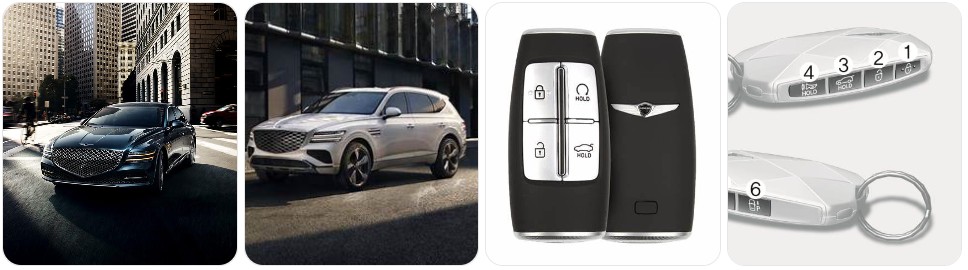
Buy Key Fob Battery Replacement for Genesis
When shopping for a Genesis key fob battery replacement, the main thing you want to match is the exact battery code already inside the remote. For most Genesis smart keys, that battery is a CR2032 3V lithium coin cell. That means the easiest and safest way to buy the right replacement is to open the fob, confirm the code on the old battery, and then order the same size. If you want to browse options first, you can compare Genesis key fob battery replacements, or go straight to CR2032 replacements for Genesis key fobs if you already know the battery type.
- CR2032 replacement battery: This is the most common battery type for Genesis smart keys, including many G70, G80, G90, GV70, and GV80 remotes. A good starting point is to compare CR2032 replacement batteries that fit many Genesis key fobs. Typical price: about $5 to $12 for a multi-pack.
- Name-brand CR2032 options: If you want stronger shelf life and more consistent performance, a name-brand battery such as Panasonic CR2032 or Energizer CR2032 can be worth the slight premium. Typical price: about $6 to $15 depending on brand and pack size.
- Genesis key fob battery kits: Some replacement kits include both the correct coin battery and a small pry tool, which can make the first battery swap easier and help prevent marks on the fob case. You can compare Genesis key fob battery kits. Typical price: about $8 to $18.
- Genesis key shell and battery bundles: If your remote still works but the buttons are worn or the case is cracked, it may be worth browsing Genesis key shell and battery bundles so you can refresh both at the same time. Typical price: about $10 to $25.

Key Fob Batteries for Genesis & Hyundai (2-Pack) CR2032 – Accent, Azera, Elantra/GT, Entourage, Equus, Genesis/Coupe/Sedan, Ioniq, Kona, Palisade, Santa Cruz, Santa Fe, Sonata, Tucson

Duracell 2032 Lithium Battery, 2 Count (Pack of 1), Child Safety Features, Compatible with Key Fob, Tea Light Candles and Other Devices, CR2032 Battery

Lucrum Key Fob Battery Replacement for Hyundai & Genesis (2012-2021) Accent, Santa Fe, Sonata, Tucson, Elantra, Kona - 2PCs CR2032 Batteries for Car Remote Key CR 2032
Genesis Key Fob Battery Replacement by Model
- Genesis G70 key fob battery replacement: Many Genesis G70 smart keys use a CR2032 battery. If your G70 has weak range or inconsistent unlock response, a fresh G70 CR2032 replacement is usually the first thing to try.
- Genesis G80 key fob battery replacement: The G80 commonly uses the same Genesis smart-key family, and many versions also take a CR2032. Before ordering, confirm the code on the old battery and then compare G80 battery options.
- Genesis G90 key fob battery replacement: Because the G90 uses a premium smart key with multiple convenience features, low battery symptoms often show up first as reduced range or delayed button response. Matching the original battery code is still the safest route.
- Genesis GV60 key fob battery replacement: If your GV60 still uses a standard physical smart key remote in your market, check the old battery code before buying. The most common fit is still CR2032, but you should always confirm the exact fob version first.
- Genesis GV70 key fob battery replacement: Many GV70 owners will be replacing a CR2032 battery. If you want a ready-to-buy option before opening the remote, browse GV70 battery replacements.
- Genesis GV80 key fob battery replacement: The GV80 smart key typically follows the same Genesis battery pattern. A weak fob battery can show up as poor remote range, delayed lock response, or a warning message in the instrument cluster.
- Older Hyundai Genesis and Genesis Coupe key fob battery replacement: Earlier Genesis-related models also commonly use a CR2032. If you are replacing the battery on an older Genesis sedan or coupe, compare Genesis Coupe CR2032 replacements after verifying the original battery number.
To choose the right replacement key fob battery for Genesis, start with the battery code inside your existing remote rather than guessing by model name alone. Genesis has used several smart key housings across sedans and SUVs, and trim, market, or model year differences can matter. In most cases the right answer will still be a CR2032, but the safest match is always the same code printed on the original battery, installed in the same orientation. If your remote housing is also worn, it can help to compare Genesis replacement key fob shells at the same time.
How to Replace a Genesis Key Fob Battery
- Gather the tools needed. You will need your Genesis key fob, the correct replacement battery, and a small flathead screwdriver or trim-safe pry tool. If you want a tool that is easier on the case, compare a small flathead screwdriver, a precision screwdriver set, or plastic pry tools.
- Remove the mechanical key. Press the release on the back or side of the Genesis smart key and slide out the emergency key blade. This gives you access to the opening point for the remote shell.
- Open the key fob carefully. Insert the flathead screwdriver or pry tool into the seam near the emergency-key slot. Twist gently until the case begins to separate. Work slowly to avoid marking the housing or cracking the clips.
- Separate the case halves. Once the shell starts to loosen, continue around the edge until the two halves come apart. Keep the button pad and inner pieces aligned as you open it.
- Identify the battery type. Look at the code stamped on the old battery before removing it. Many Genesis key fobs use CR2032, and this is your final confirmation that you have the right replacement.
- Remove the old battery. Lift the battery out gently with your fingernail, the flat edge of the tool, or a non-metal pry tip. Avoid bending the retaining clip or scraping the contact points.
- Install the new battery in the same orientation. Match the old battery exactly, paying close attention to the positive (+) side. Most Genesis fobs expect the new CR2032 to sit flat and fully under the retaining clip.
- Inspect the inside of the fob. Before closing the case, check for dust, corrosion, or a rubber seal that has shifted out of place. A clean, dry microfiber cloth is enough for a quick wipe if needed.
- Snap the fob back together. Align both halves carefully and press around the edges until the shell clicks back into place. Reinsert the mechanical key.
- Test every function. Stand near the vehicle and test lock, unlock, trunk or liftgate release if equipped, remote start if equipped, and push-button start recognition. If the Genesis still does not respond, reopen the remote and double-check battery size, polarity, and seating.
Common Genesis Key Fob Problems
- Genesis key fob still does not work after battery replacement: The most common reasons are the battery being installed upside down, a weak low-quality cell, or the battery not sitting fully under the retaining clip. Recheck whether the old battery was marked CR2032.
- Short operating range: If the remote only works when you are standing very close to the vehicle, the new battery may already be weak or the contact points may not be making full contact. Switching to a fresh CR2032 replacement battery often helps.
- Low key battery warning returns quickly: That may mean the replacement battery was old stock, poor quality, or the Genesis key fob has an internal issue that is draining power faster than normal.
- Buttons feel mushy or stop clicking cleanly: This is often a shell or rubber-button problem rather than a battery problem. In those cases, a Genesis key fob shell replacement can be more useful than another battery swap.
- Push-button start works only when the fob is very close: That is a common low-battery sign on Genesis smart keys and usually improves immediately after fitting the correct new battery.
- The case will not close after installation: This usually means the battery is not seated flat or the wrong thickness was used. Never force the shell closed because that can crack the clips or damage the internals.
- Emergency key still works but remote buttons do not: That points to an electronic issue inside the fob, poor battery contact, or a battery installation problem rather than a problem with the door lock itself.

Keylessbest Replacement for 2015 2016 Hyundai Genesis Key Fob Remote Control SY5MDFNA433 4 Buttons 434MHz

Key Fob Remote Replacement Fits for 2010-2015 Hyundai Sonata Genesis Azera 2009-2013 Kia Optima 2011-2014 Kia Ria Forte Borrego Keyless Entry Remote SY5HMFNA04 (Pack of 2)

Smart Key for Hyundai Genesis G70 2021-2023, Alliskeys 6-Buttons Proximity Key Fob Replacement for Hyundai Genesis G70 2021 2022 2023 TQ8-FOB-4F36 95440-G9630
Battery Replacement vs New Key Fob for Genesis
For most Genesis owners, replacing the battery is the best first step because it is inexpensive, quick, and often solves the problem right away. If your remote has weak range, delayed response, a low-battery warning, or inconsistent push-button start detection, a fresh replacement battery is usually the right starting point. In many cases, there is no need to replace the full smart key if the buttons and case are otherwise in good shape.
A new Genesis key fob makes more sense when the remote has broken buttons, water damage, a cracked circuit board, or no response even after installing the correct battery properly. If only the outer case is damaged, a shell replacement may be enough and can cost much less than buying a complete electronic remote. The smart approach is usually to try the battery first, consider a replacement shell if the housing is worn, and move to a full new fob only when the electronics themselves are clearly failing.
Genesis Key Fob FAQ
What battery does a Genesis key fob use?
Most Genesis key fobs use a CR2032 3V lithium coin battery. The safest way to confirm is to open the remote and check the number printed on the old battery.
Can I replace a Genesis key fob battery myself?
Yes. In most cases, Genesis key fob battery replacement is a simple DIY job that takes only a few minutes and requires the correct coin battery plus a small flathead screwdriver or pry tool.
How do I know if my Genesis key fob battery is dying?
Common signs include shorter operating range, delayed lock or unlock response, needing multiple button presses, a low key battery warning, or inconsistent push-button start recognition.
Will changing the battery erase my Genesis key fob programming?
No, a normal battery replacement does not usually erase the fob programming. If the remote does not work afterward, the issue is more likely battery orientation, poor contact, or an unrelated fault inside the fob.
How long does a Genesis key fob battery last?
Battery life depends on usage and battery quality, but many Genesis key fob batteries last around two to four years before range or reliability starts to drop.
What should I do if my Genesis key fob still does not work after changing the battery?
Reopen the remote and verify the battery code, polarity, and fit under the retaining clip. If everything looks correct, inspect the contacts and case, and consider whether the shell or internal electronics may also be damaged.
Do I need a new Genesis key fob or just a new battery?
If the Genesis remote only shows weak range or low-battery symptoms, a fresh battery is usually enough. If it has broken buttons, water damage, or no response even with the correct new battery, then a shell replacement or full new key fob may be the better solution.
Can I keep a spare battery for my Genesis key fob?
Yes. Keeping a spare CR2032 battery in the glove box, garage, or home drawer is a smart idea, especially if your Genesis is your daily driver and you want to avoid being caught with a weak remote.

ACDelco Gold 48AGM (88864541) 36 Month Warranty AGM BCI Group 48 Battery

ACDelco Gold 94RAGM (88864542) 36 Month Warranty AGM BCI Group 94R Battery
