If your Perodua key fob has weak range, needs repeated button presses, or suddenly stops locking and unlocking the car properly, the fix is often just a fresh battery. In most cases, Perodua smart keys use a CR2032 battery, although some older or less common remote styles may use CR2016 or CR2025, so it is always best to confirm the battery code printed on the old cell before buying a replacement. If you are also maintaining the main battery on your Perodua, you can check this Perodua guide for model-specific car battery advice. This article covers what battery a Perodua key fob uses, how to buy the right replacement, model-by-model notes, step-by-step replacement instructions, common key fob issues, and when a full new key fob makes more sense than another battery swap.
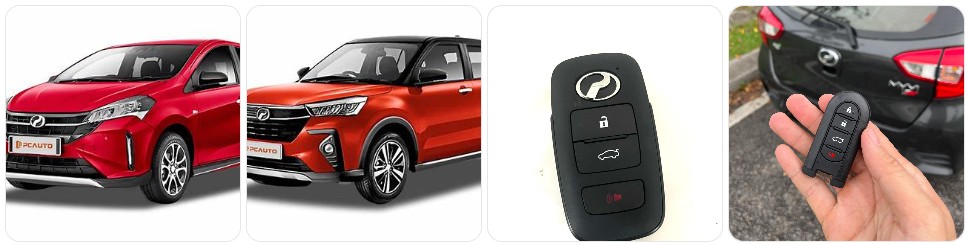
Buy Key Fob Battery Replacement for Perodua
Buying the right Perodua key fob battery replacement is mostly about matching the original battery number already inside your remote. For many Perodua smart keys, the correct battery is a CR2032 3V lithium coin cell. Some older remote or flip-key designs may use CR2016 or CR2025, so you should open the fob and confirm the code before ordering. If you already know your size, you can browse Perodua key fob battery replacements, compare CR2032 replacements for Perodua key fobs, or check CR2025 options for Perodua remotes if your battery is marked differently.
- CR2032 replacement battery: This is the most common choice for Perodua smart entry remotes, especially for newer Myvi, Bezza, Alza, and Ativa style keys. A simple multi-pack of CR2032 replacement batteries for Perodua key fobs is usually the easiest option. Typical price: about $5 to $12 for a multi-pack.
- CR2025 replacement battery: Some Perodua remotes use a thinner coin cell, so do not force a CR2032 into a fob designed for CR2025. If your old battery says CR2025, compare CR2025 replacements that fit many Perodua key fobs. Typical price: about $5 to $11.
- CR2016 replacement battery: Less common, but still worth checking if you have an older flip key or a smaller remote design. If that is what your original battery shows, browse CR2016 replacement batteries for Perodua remotes. Typical price: about $5 to $10.
- Name-brand battery options: If you want longer shelf life and more consistent voltage, a name-brand Panasonic CR2032, Energizer CR2032, or similar battery is often worth the small extra cost. Typical price: about $6 to $15 depending on pack size.
- Battery and shell bundles: If your Perodua key fob still works but the buttons are worn or the casing is cracked, it may be worth browsing Perodua key fob shell and battery kits so you can refresh the battery and housing at the same time. Typical price: about $10 to $25.

CR2032 Key Fob Replacement Batteries, Universal Fit, Pack of 2

Key Fob Battery Replacement for Jeep Dodge Ram Chrysler CR2032 Batteries

CR2032 Key Fob Battery Replacement (2 Pack)
Perodua Key Fob Battery Replacement by Model
- Perodua Myvi key fob battery replacement: Many Myvi smart keys use a CR2032, especially newer generations with smart entry. If you want to compare options before opening the remote, browse Myvi key fob battery replacements, then match the number printed on your original battery.
- Perodua Bezza key fob battery replacement: Bezza smart entry remotes are commonly matched with CR2032, but battery confirmation is still important because remote styles can vary by trim and year. You can compare Bezza battery options before disassembly.
- Perodua Axia key fob battery replacement: Axia remotes often use the same small coin-cell style as other Perodua keys, with CR2032 being the most common smart-key choice. Search Axia replacement batteries if you want a spare ready before opening the fob.
- Perodua Alza key fob battery replacement: Many Alza smart keys use CR2032, and battery replacement is usually simple once the emergency key is removed and the housing is gently pried open. If your remote shell is tired, you may also want to compare shell kits at the same time.
- Perodua Ativa key fob battery replacement: Ativa owners usually deal with a modern smart key that often uses CR2032. A weak battery can cause intermittent lock response or poorer push-start recognition, so it is smart to keep a spare Ativa replacement battery on hand.
- Perodua Aruz key fob battery replacement: Aruz remotes are usually easy to service at home, but always check polarity before snapping the housing back together. If the fob is not recognized from normal distance, a fresh coin cell is the first thing to try.
- Older Perodua flip keys or standard remotes: Some older keys may use CR2016 or CR2025 instead of CR2032. The safest method is always to open the fob, read the old battery code, and buy the same size rather than guessing by model alone.
To choose the right replacement key fob battery for Perodua, start with the battery already inside your remote and match the number exactly. That matters because coin cells can look similar while having different thickness and capacity. A Perodua fob designed for CR2025 may not close properly with CR2032, while a fob designed for CR2032 may not hold a thinner battery securely if you install CR2025 or CR2016. If the casing is also worn out, it can be convenient to compare Perodua replacement key fob shells when buying the battery so you only open the remote once.
How to Replace a Perodua Key Fob Battery
- Get the tools ready. You will need the correct new battery, your Perodua key fob, and a small pry tool or screwdriver. Many owners use a small flathead screwdriver, a precision screwdriver set, or plastic pry tools to open the casing cleanly.
- Remove the emergency key. Press the release button or slide latch on the Perodua key fob and pull out the mechanical key blade. This usually reveals the point where the casing can be separated.
- Open the casing carefully. Insert the pry tool or flathead screwdriver into the seam near the emergency-key slot and twist gently. Work slowly so you do not crack the clips or mar the edges of the Perodua key shell.
- Separate both halves of the key fob. Once the clips start to release, open the fob carefully and keep the internal buttons or rubber pad aligned so nothing shifts out of place.
- Check the old battery code. Before removing the battery, read the number printed on it. Many Perodua smart keys use CR2032, but some remotes may use CR2025 or CR2016. This is the most important step for getting the right replacement.
- Remove the old battery gently. Lift it out with your fingernail, a plastic tool, or the screwdriver tip. Do not bend the retaining clip or scrape the contacts unnecessarily.
- Install the new battery with the correct orientation. Match the old battery exactly, paying attention to the positive (+) side. If the battery is upside down, the Perodua key fob will not work even though the battery is new.
- Inspect the contacts and interior. If needed, wipe away dust lightly with a dry cloth. If the contacts look bent or dirty, correct that before snapping the key back together.
- Close the key fob housing. Line up both halves and press them together evenly until the clips snap shut. Reinsert the emergency key blade.
- Test all Perodua key functions. Check lock, unlock, boot release if equipped, and panic if available. If your car uses push-button start, confirm the vehicle recognizes the key from normal range.
- If the key still does not work, recheck the basics. Most post-replacement issues come from the wrong battery size, backward installation, a battery not seated fully, or a shell clip that is preventing the battery from making full contact.
Common Perodua Key Fob Problems
- Perodua key fob range is suddenly very short: This is one of the clearest signs of a weak battery. If you need to stand very close to the car before it responds, a fresh replacement battery is the first thing to try.
- Lock or unlock works only sometimes: Intermittent button response is usually caused by a low battery, dirty contact points, or worn rubber buttons inside the Perodua key shell.
- Push-button start recognition is inconsistent: If your Perodua only recognizes the smart key when it is held very close to the start button, the battery may be close to dead.
- The key fob still does not work after a battery swap: Reopen the remote and verify the battery size and polarity. Many problems come from installing a CR2025 where a CR2032 belongs, or from putting the battery in upside down.
- The casing will not close properly: This often means the battery is too thick for that Perodua remote, or it is not seated flat under the retaining clip. Never force the housing closed.
- Buttons feel soft, split, or worn: In that case, a replacement shell may be enough without replacing the electronic board inside the fob.
- Battery drains faster than expected: If a new battery dies unusually quickly, the remote could have an internal issue, poor battery contact, or a low-quality replacement battery.
- The emergency key works but the remote does not: That usually means the problem is in the key fob battery, internal circuit board, or contact points rather than the car’s door lock itself.

TECART 2-Button Key Cover Fit for Toyota Rush for Daihatsu Tanto LA600S LA800S Perodua Key Fob Smart Key Holder TPU Black

TECART Key Fob Case Cover Fit For Toyota Rush Daihatsu Tanto LA600S LA800S LA610S Key Shells Key Accessories 2 Button Silver

Ysbxitu Hand-sewn Leather Smart Key Fob Cover 2 Buttons Compatible with Daihatsu Rocky Tanto Toyota Raize Yaris Ativ Perodua Veloz Avanza Rush Key controller protective cover Keychain Clip Blue
Battery Replacement vs New Key Fob for Perodua
For most Perodua owners, battery replacement is the smartest first step because it is inexpensive, fast, and often solves weak-range or no-response issues right away. If the remote used to work normally and the only symptom is poor range, delayed response, or inconsistent smart-entry detection, start with a fresh replacement battery. In many cases, that is all the Perodua key fob needs.
A new Perodua key fob is usually only worth considering when the remote has cracked electronics, water damage, broken internal buttons, or total failure even after the correct fresh battery has been installed. If the board still works but the case is worn, a replacement shell can be a much cheaper fix than a full new key. Save the full fob replacement for situations where the transmitter is actually failing, since a new complete key may also require programming and key-blade work.
Perodua Key Fob FAQ
What battery does a Perodua key fob use?
Most Perodua smart keys use a CR2032 battery, but some older or less common remote styles may use CR2025 or CR2016. The safest method is to open the fob and match the code printed on the old battery exactly.
How do I know if my Perodua key fob battery is weak?
Common signs include shorter operating range, needing multiple button presses, delayed lock or unlock response, and inconsistent recognition for push-button start models.
Can I replace a Perodua key fob battery myself?
Yes. In most cases it is a quick DIY job that only needs the correct coin battery and a small pry tool or screwdriver to open the casing carefully.
Will changing the battery erase my Perodua key programming?
No, a normal battery change does not usually erase the key programming. If the key does not work afterward, the issue is more likely battery orientation, poor contact, or the wrong battery size.
Can I use CR2025 instead of CR2032 in a Perodua key fob?
Only if your original battery is CR2025. These coin cells look similar but have different thickness, so using the wrong one can cause weak contact or prevent the casing from closing properly.
How long does a Perodua key fob battery last?
Many key fob batteries last roughly two to four years, depending on usage, temperature, and battery quality.
What should I do if the Perodua key fob still does not work after changing the battery?
Reopen the fob and confirm the battery code, polarity, and seating. If those are correct, inspect the contacts and the shell, then consider whether the remote may have internal electronic damage.
Should I replace the whole key fob or just the battery?
If the remote only has weak range or delayed response, the battery is usually the right fix. If the key fob has broken electronics, heavy wear, or no response even with a correct fresh battery, a shell replacement or full new key fob may be necessary.