If your Hino remote is getting weak, works only at close range, or needs repeated button presses, the first thing to try is a battery replacement. In many cases, a Hino key fob uses a small 3V coin-cell battery such as a CR2032 or CR2025, depending on the remote style, so the best approach is to open the fob and match the code printed on the old battery before buying a replacement. If you also maintain the truck’s main electrical system, it may help to review Hino battery options as well. This guide covers what battery a Hino key fob may use, how to choose the right replacement, model-specific notes, step-by-step replacement instructions, common remote issues, and when it is smarter to replace the entire fob instead of just the battery.
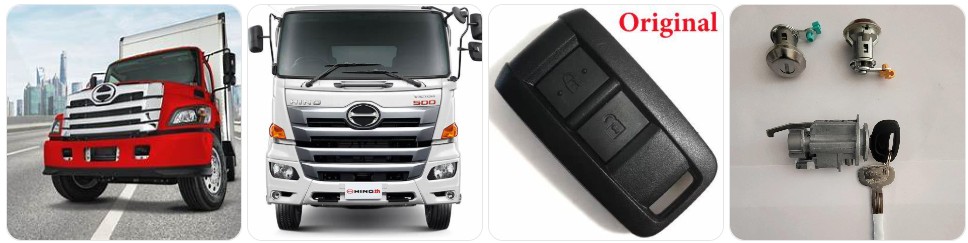
Buy Key Fob Battery Replacement for Hino
When shopping for a Hino key fob battery replacement, the most important thing is matching the exact battery code already inside your remote. Many Hino remotes and aftermarket replacement fobs use a CR2032 3V lithium coin battery, while some compact remotes may use a CR2025. Because Hino trucks can use different key and remote setups depending on model, year, trim, fleet upfit, and whether the fob is OEM or aftermarket, the safest method is to open the remote and confirm the number printed on the old battery before ordering. You can compare Hino key fob battery replacements, or go directly to CR2032 options for Hino key fobs and CR2025 options for Hino key fobs if you already know the correct size.
- CR2032 replacement battery for Hino key fobs: This is one of the most common coin-cell sizes used in many remote-entry fobs, including numerous heavy-duty and fleet remote styles. If your old Hino battery says CR2032, browse CR2032 replacements that fit many Hino key fobs. Typical price: about $5 to $14 for a multi-pack.
- CR2025 replacement battery for Hino key fobs: Some slim remotes use CR2025 instead of CR2032. Even though both are 3V coin cells, the thickness is different, so always match the original battery code. Compare CR2025 replacements for Hino remotes if that is the number printed on your old battery. Typical price: about $5 to $12 for a multi-pack.
- Name-brand battery packs: If your Hino is part of a working fleet and you do not want to deal with weak remote performance again soon, it can be worth choosing a higher-quality replacement like Panasonic CR2032 batteries or Energizer CR2025 batteries. Typical price: about $6 to $16 depending on brand and pack size.
- Replacement shell and battery kits for Hino remotes: If your Hino key fob still sends a signal but the case is cracked, the button pad is worn, or the battery cover is loose, it may make sense to shop for replacement shell and battery kits for Hino remotes at the same time. Typical price: about $10 to $25.
Key Fob Replacement Batteries for Honda, Pack of 2

CR2032 Key Fob Replacement Batteries - Universal Fit Car Key Battery 2 Pack

CR2032 Key Fob Battery Replacement (2 Pack)
Hino Key Fob Battery Replacement by Model
- Hino 155 key fob battery replacement: Light-duty Hino 155 trucks may be equipped with different remote styles depending on fleet configuration and aftermarket security additions, so the best practice is to confirm the battery code from inside the fob before ordering. Search Hino 155 key fob battery options if you want model-specific listings.
- Hino 195 key fob battery replacement: Many owners and fleet technicians find that remote battery replacement is the fastest first fix when lock or unlock response becomes inconsistent. Open the remote carefully and match the original battery number exactly.
- Hino 238 key fob battery replacement: Hino 238 trucks can use factory or replacement remotes, and those do not always share the same coin-cell size. If your remote has been replaced at some point, never assume the battery size from the truck model alone.
- Hino 258 key fob battery replacement: If the Hino 258 remote begins working only when close to the truck, battery replacement is often the simplest place to start. Compare Hino 258 battery options after confirming whether the old cell is CR2032 or CR2025.
- Hino 268 key fob battery replacement: One of the more commonly searched Hino truck remote topics. Since these trucks often stay in demanding commercial use, a good-quality battery matters. It can help to keep a spare Hino 268 replacement battery in the glove box or maintenance cabinet.
- Hino 338 key fob battery replacement: If your Hino 338 remote loses range or becomes intermittent, start by replacing the battery before assuming the fob needs to be reprogrammed. Search Hino 338 replacement battery options if you want a model-focused search.
- Hino L6 and L7 key fob battery replacement: Newer Hino L Series trucks may use updated remote styles or dealer-supplied replacements, which makes battery confirmation inside the fob especially important. The right battery is the one printed on the battery already installed in your specific remote.
- Hino XL7 and XL8 key fob battery replacement: Because these trucks are often used in vocational or commercial service, remotes can go through hard daily use. If the shell is damaged, it may be worth checking replacement shells for Hino remotes along with the battery.
To choose the right replacement key fob battery for Hino, rely on the battery already inside the remote rather than only the truck’s model name. Hino trucks may be paired with factory remotes, dealer-installed accessories, alarm-system remotes, or aftermarket replacement fobs, and that means the correct battery can vary even between trucks of the same series. The best replacement is the same battery code, the same size, and a quality lithium coin cell from a reliable brand. If the remote housing is damaged but the electronics still work, it can also help to compare replacement Hino key fob shells before you open the remote so you can handle everything in one pass.
How to Replace a Hino Key Fob Battery
- Gather the tools and replacement battery first. You will need your Hino key fob, the correct new battery, and a small opening tool. Most people use a small flathead screwdriver, a precision screwdriver set, or plastic pry tools to open the shell without damaging the clips.
- Remove the metal key if your Hino remote has one. Some Hino fobs include an emergency or auxiliary key. Press the release button and slide the key out before opening the case.
- Locate the seam in the remote housing. Look around the edge of the Hino fob for the split line where the two halves join. There is often a small notch near the key slot where a tool can be inserted more easily.
- Open the remote carefully. Insert the flathead screwdriver or pry tool gently into the seam and twist lightly. Work around the edge instead of forcing one spot. This reduces the chance of cracking the Hino fob shell or snapping the retaining clips.
- Note the battery size and orientation. Before removing the old battery, check the code printed on it. In many Hino remotes this may be CR2032 or CR2025. Also look carefully at which side of the battery faces up so the new one goes in the same way.
- Remove the old battery without bending the contacts. Lift the battery out gently using a fingernail, plastic tool, or the edge of a small screwdriver. Avoid putting too much pressure on the metal contact tabs inside the remote.
- Install the new battery in the same position. Match the old battery exactly, paying close attention to the positive (+) side. A battery installed upside down is one of the most common reasons a Hino key fob does not work after replacement.
- Inspect the internal parts before closing the fob. Make sure the button pad is seated correctly, the battery sits flat, and no dirt or debris is interfering with the contacts. If the shell is worn, compare Hino key fob shell replacements before reassembly.
- Snap the case back together evenly. Align both halves and press them together carefully until all clips lock. If the case will not close, stop and check whether you used the wrong battery thickness.
- Test the Hino remote functions. Stand near the truck and test lock, unlock, alarm, or other remote features. If it still does not work, re-open the fob and verify the battery code, polarity, and contact position before moving on to a replacement remote.
Common Hino Key Fob Problems
- Hino key fob works only at very short range: This is one of the most common signs of a weak battery. Replacing the coin cell with a fresh replacement battery is usually the first thing to try.
- Remote does not work after battery replacement: The most likely causes are incorrect battery orientation, the wrong battery size, or poor contact inside the fob. Double-check whether the original battery was CR2032 or CR2025 and make sure the new cell is seated correctly.
- Buttons feel worn, mushy, or inconsistent: In working trucks, remotes often get heavy use. If the battery is new but the buttons still respond poorly, a replacement shell or button pad may help if the internal electronics are still good.
- Battery cover or case no longer stays shut: This is common when the shell clips are worn or the wrong battery thickness was installed. Never force the housing closed if it resists.
- Intermittent lock or unlock response: A dying battery, dirty internal contacts, or moisture inside the remote can all cause random performance issues in a Hino key fob.
- Remote stopped working after being dropped: If the Hino fob has been dropped on concrete or shop floors, the circuit board, contact tabs, or battery retainer may be damaged even if the case still looks fine from the outside.
- Aftermarket replacement remote behaves differently from the original: Some Hino trucks use replacement remotes that look similar but have a different shell layout or battery fitment. Always check the battery installed in your actual remote rather than assuming it matches the factory original.

Ilco X274 Hino Truck Key Blank Pack of 10

USARemote Key Fob Replacement for 2004 2005 2006 2007 2008 2009 2010 2011 Porsche Cayenne 4-Button Keyless Entry Remote Flip Key KR55WK45032 KR55WK45022 267-104-187 (2-Pack)
Battery Replacement vs New Key Fob for Hino
For most Hino owners and fleet operators, battery replacement is the best first step because it is inexpensive, quick, and often restores normal remote operation right away. If the Hino fob still works sometimes, the signal range has dropped, or the buttons respond only after repeated presses, a fresh coin-cell battery is the logical first fix. In many cases, a simple battery replacement is all that is needed.
A full new key fob becomes the better option when the shell is broken, the circuit board is damaged, the remote was exposed to water, or it still does not work after the correct new battery has been installed properly. If the housing is the only issue, a replacement shell may be enough. But if the remote electronics are failing, you may need a complete replacement key fob that matches your Hino truck and may require programming before it works correctly.
Hino Key Fob FAQ
What battery does a Hino key fob use?
Many Hino key fobs use a CR2032 or CR2025 3V lithium coin battery, depending on the remote style. The safest way to confirm the correct battery is to open the remote and match the code printed on the old battery.
Can I replace a Hino key fob battery myself?
Yes. In most cases, Hino key fob battery replacement is a simple DIY job that only takes a few minutes with the correct coin battery and a small opening tool.
Why does my Hino key fob still not work after changing the battery?
The most common reasons are the wrong battery size, upside-down installation, poor battery contact, or internal damage inside the remote. Recheck the battery code and orientation first.
Can I use a CR2032 instead of a CR2025 in a Hino remote?
Only if your specific Hino key fob was designed for CR2032. Even though both batteries are 3V, the thickness is different, so using the wrong one can create fit and contact problems.
How long does a Hino key fob battery last?
Battery life depends on usage, climate, and battery quality, but many key fob batteries last roughly two to four years before remote range and reliability begin to drop.
Does changing the battery erase the Hino key fob programming?
No, a normal battery replacement does not usually erase remote programming. If the fob stops working afterward, the cause is usually battery fitment, polarity, or an unrelated remote problem.
Should I replace the battery or the entire Hino key fob?
If the remote only has weak range or inconsistent button response, start with the battery. If the shell is broken, the board is damaged, or the remote still does not work after a correct battery replacement, a shell replacement or complete new key fob may be the better solution.
What tools do I need to open a Hino key fob?
A small flathead screwdriver, precision screwdriver set, or plastic pry tool is usually enough to open the shell and replace the coin-cell battery safely.