
If your Leapmotor key fob is starting to work only at close range, needs repeated button presses, or triggers a low key warning, the usual fix is a simple battery swap. Most Leapmotor smart keys are commonly listed with a CR2032 coin battery, although it is still best to open the fob and confirm the exact code on the old battery before buying a replacement. If you are also comparing broader brand-related battery guides, you can browse Leapmotor on the car brands directory. In this guide, you will find what battery a Leapmotor key fob usually uses, how to choose the right replacement, step-by-step battery replacement instructions, model-specific notes, common problems after installation, and when it makes more sense to replace the entire fob instead of only the battery.
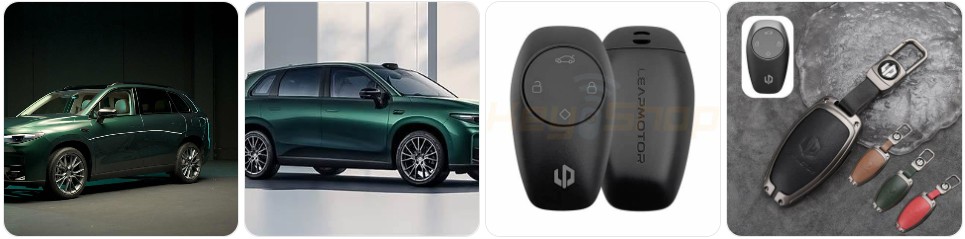
Buy Key Fob Battery Replacement for Leapmotor
When buying a key fob battery replacement for Leapmotor, the safest choice is to match the battery code already installed inside your remote. For many Leapmotor smart keys, the battery is commonly a CR2032 3V lithium coin cell, but some replacement shells and aftermarket housings may be sold with different battery references, so checking the old battery before ordering is always the best move. If you want to compare options first, you can browse Leapmotor key fob battery replacements or go directly to CR2032 replacements for Leapmotor key fobs if your current battery matches that size.
- CR2032 replacement battery: This is the most common starting point for Leapmotor smart key battery replacement. It fits many modern Leapmotor key fobs and offers the capacity most owners expect from a daily-use remote. Compare CR2032 replacements for Leapmotor key fobs if your original battery shows the same code. Typical price: about $5 to $14 for a multi-pack.
- Name-brand coin cells for longer shelf life: If you want a stronger backup supply for a Leapmotor you drive every day, it can be worth looking at Panasonic CR2032 batteries, Energizer CR2032 batteries, or similar replacements from established brands. Typical price: about $6 to $15 depending on pack size.
- Battery and shell kits: If the Leapmotor remote still works but the buttons are worn or the case is cracked, you may want to shop for a battery and housing together. Compare Leapmotor key fob shell and battery kits so you can refresh both parts at once. Typical price: about $10 to $25.
- Spare multi-packs for shared drivers: If more than one person uses the vehicle or you keep a second key in rotation, a multi-pack can be the easiest choice. Browsing Leapmotor-compatible CR2032 multi-packs can help you keep a spare ready in the glove box or at home.

Key Fob Replacement Batteries for Chevy & GMC (Silverado Equinox Malibu Traverse Cruze Sierra Acadia Terrain Colorado Impala Trax Camaro Tahoe Yukon Trailblazer) Remote Key (2-Pack) (Check Fit Guide)

SHI Key Fob Replacement Batteries - Universal Fit, Compatible with Car Key Fobs for Nissan, Toyota, Honda, Chevy, GMC, Ford, Jeep, Dodge, Ram, Chrysler, Mazda, Subaru, Hyundai, Kia & More

CR2032 Key Fob Battery Replacement (2 Pack) – Compatible with Key Fobs That Require CR2032 – Universal Fit – Video Installation Guide Included
Leapmotor Key Fob Battery Replacement by Model
- Leapmotor T03 key fob battery replacement: The T03 is one of the most commonly searched Leapmotor models for remote battery issues. Many T03 smart keys are associated with a CR2032 battery, so checking Leapmotor T03 battery options is a practical place to start once you verify the code on the old battery.
- Leapmotor C10 key fob battery replacement: The C10 uses modern smart access features, so a weak key battery often shows up as reduced lock range or inconsistent vehicle recognition. In most cases, owners should start by confirming whether the remote uses a CR2032 and then compare Leapmotor C10 replacement batteries.
- Leapmotor C11 key fob battery replacement: The C11 smart key is usually serviced the same way as other Leapmotor keyless remotes: open the housing carefully, read the battery code, and replace it with the same size. If you want model-focused results, browse Leapmotor C11 battery listings.
- Leapmotor C01 key fob battery replacement: For the C01 sedan, battery symptoms usually show up first as weaker response distance or delayed unlock operation. Before buying, it is smart to match the original battery code and then compare Leapmotor C01 battery options.
- Leapmotor C16 key fob battery replacement: Because newer Leapmotor models may share similar smart key designs, the replacement process is often straightforward. Still, it is better to verify the actual battery type in the fob rather than assuming every C16 uses the same coin cell.
- Leapmotor B10 key fob battery replacement: If the B10 key fob starts losing range or the vehicle intermittently fails to detect the remote, the battery is the first thing to check. Use the old battery number as the final confirmation before ordering.
- Leapmotor S01 key fob battery replacement: The S01 remote can usually be refreshed quickly with the correct coin battery, but take extra care when opening the case so the clips and internal button pad stay aligned.
To choose the right replacement key fob battery for Leapmotor, match the battery number printed on the old cell rather than relying only on model name or aftermarket listing titles. Leapmotor has used smart remote keys, NFC access options, and market-specific hardware variations, so it is possible to see small differences in remote housings even within the same model family. The best replacement is the same battery code, the same thickness, and a quality lithium coin cell from a trusted brand. If your fob housing is worn, it can also help to compare Leapmotor replacement key fob shells while you are ordering the battery.
How to Replace a Leapmotor Key Fob Battery
- Gather the tools you need. You will usually need the Leapmotor key fob, the correct replacement battery, and a small flathead screwdriver or plastic pry tool. Good options include a small flathead screwdriver, a precision screwdriver set, or plastic pry tools if you want to reduce the chance of marking the case.
- Remove the emergency key if your fob has one. Many Leapmotor smart keys include a hidden mechanical key or release section. Press the release catch and slide the emergency key out before opening the casing.
- Find the opening seam. Look along the edge of the key fob near the emergency key slot or center seam. This is usually the safest place to insert the pry tool or screwdriver.
- Open the fob carefully. Twist gently rather than forcing the tool straight in. The goal is to pop the case clips loose without cracking the shell or knocking internal parts out of place.
- Separate the housing halves. Once the first clip releases, work around the edge slowly until the casing comes apart. Keep the button pad and internal board aligned while opening.
- Identify the old battery. Before removing it, read the battery code stamped on the battery itself. Many Leapmotor key fobs will commonly show CR2032, and matching that exact number is the safest replacement method.
- Remove the old battery. Lift it out gently with a fingernail, plastic tool, or the tip of the screwdriver. Avoid bending the retaining clip or scraping the contacts.
- Install the new battery in the same orientation. Make sure the positive (+) side faces the same direction as the old battery. If the battery is upside down, the Leapmotor key fob will not work even though the battery is new.
- Inspect the inside before closing. Check that the rubber buttons, battery contacts, and any sealing edges are sitting correctly. If you see dust or light debris, wipe it gently with a dry soft cloth.
- Snap the fob back together and test it. Press the halves together evenly until the clips click into place, reinsert the emergency key, and test lock, unlock, trunk or hatch access if equipped, and vehicle recognition from normal range.
Common Leapmotor Key Fob Problems
- The Leapmotor key fob still does not work after battery replacement: The most common causes are the wrong battery size, reversed polarity, poor battery contact, or a battery that is not seated fully under the clip.
- Weak operating range: If the remote only works very close to the vehicle, the battery may be low quality, old from storage, or not the correct size. Switching to a fresh CR2032 replacement battery from a reliable brand is often the first fix.
- Vehicle detects the key intermittently: This can happen when the battery is weak, but it can also happen if the battery contacts are slightly bent or if the key housing is not fully snapped closed.
- Buttons feel loose, soft, or inconsistent: In many cases, that is a shell or rubber-button issue rather than a battery problem. A replacement shell may solve the problem if the electronics still work.
- The case will not close after battery installation: This often means the wrong battery thickness was used or the battery is not seated flat. Never force the key fob closed.
- Low key battery warning returns quickly: This can point to a weak replacement battery, poor contact pressure, or an internal fob issue that drains power faster than normal.
- Emergency key works but remote access does not: That usually means the issue is isolated to the remote battery, the internal board, or the button contacts rather than the vehicle door lock itself.

Ysbxitu Metal Frame Protector Key Fob Cover with Keychain Compatible with Leapmotor T03 S01 C11 C01All Around Protection Key Shell Durable Car Accessories B-Black

Ysbxitu Leather Protector Key Fob Cover with Keychain Clip Compatible with Leapmotor T03 S01 C11 C01 Anti Fall Key Fob Shell Automotive Interior Accessories A-Brown

Jinhon for Leapmotor Leather Metal Car Key Fob Cover Case Fit for Leapmotor S01 T03 B01 B10 C10 C11 C16 C01 2025 2026 Keychain Key Holder Accessories 3 Button A Gray
Battery Replacement vs New Key Fob for Leapmotor
For most Leapmotor owners, battery replacement should be the first step. It is inexpensive, quick, and often fixes the most common problems like weak range, delayed response, or a low key battery alert. If the remote still unlocks the car occasionally or the vehicle recognizes it only at short distance, a fresh replacement battery is the most practical first move. In many cases, that is all the fob needs.
A new Leapmotor key fob makes more sense when the remote has broken buttons, a damaged board, a cracked shell that no longer holds the battery securely, or complete failure even after installing the correct new battery. If the electronics still work but the outer case is worn, a replacement shell may be enough. Save a full new fob for situations where the remote itself is failing and not just the battery.
Leapmotor Key Fob FAQ
What battery does a Leapmotor key fob use?
Many Leapmotor smart keys are commonly associated with a CR2032 lithium coin battery, but the safest way to confirm is to open the fob and read the code printed on the old battery before buying a replacement.
Can I replace a Leapmotor key fob battery myself?
Yes. In most cases, Leapmotor key fob battery replacement is a simple DIY task that only takes a few minutes with the correct battery and a small pry tool or screwdriver.
How do I know my Leapmotor key fob battery is weak?
Typical signs include reduced operating range, needing to press buttons more than once, intermittent vehicle detection, or a low key battery message from the vehicle.
Will changing the battery erase my Leapmotor key fob programming?
No, a standard battery replacement does not normally erase programming. If the fob stops working afterward, the issue is usually battery orientation, battery fit, or a separate fault inside the remote.
Can I use a different coin battery if it fits?
No. You should match the exact battery code from the old cell. Using a thicker or thinner battery than the original can cause poor contact, weak performance, or prevent the case from closing correctly.
How long does a Leapmotor key fob battery last?
Battery life depends on usage, climate, and battery quality, but many key fob batteries last around two to four years before performance starts to drop.
What should I do if my Leapmotor key fob still does not work after replacing the battery?
Reopen the fob and check the battery number, polarity, and seating. Then inspect the contacts and button pad. If it still fails, the shell, internal board, or remote programming may need further attention.
Do I need a new key fob or just a new battery for Leapmotor?
If the problem is weak range or a low-battery warning, you likely only need a new battery. If the fob has broken buttons, water damage, or no response even with the correct new battery, a shell replacement or full new key fob may be the better solution.

Mighty Max Battery MM-H5 Start and Stop Car BCI Group Size 47 12V 60 AH, 100RC, 680 CCA Rechargeable AGM Car Battery
Mighty Max Battery MM-G35 Start and Stop Car BCI Group Size 35 12V 55Ah, 100RC, 650 CCA Rechargeable AGM Car battery
