If your Aiways key fob has weak range, needs repeated button presses, or shows a low-key warning, the fastest fix is usually a new coin battery. For most Aiways smart keys, the replacement is commonly a CR2032 3V lithium coin battery, and the swap usually takes only a few minutes with a small pry tool or screwdriver. If you are also comparing main 12V battery resources by brand, you can browse the Aiways battery guide directory for related battery coverage. This guide covers what battery an Aiways key fob uses, how to choose the right replacement, model-by-model notes for the U5 and U6, the exact replacement steps, common problems after installation, and when to replace the full fob instead of only the battery.
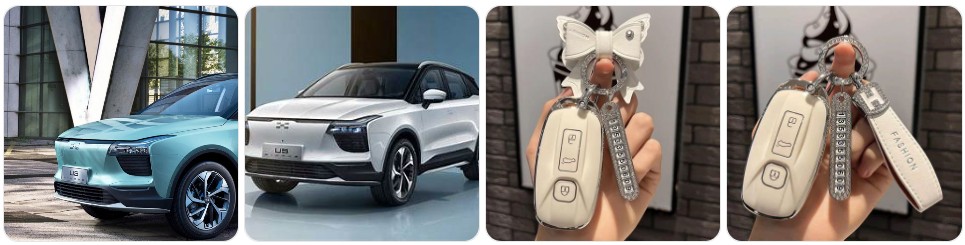
Buy Key Fob Battery Replacement for Aiways
When buying an Aiways key fob battery replacement, the safest choice is to match the battery code printed inside your current remote before ordering. For Aiways smart keys, the most commonly used replacement is a CR2032 3V lithium coin battery, which is the size many owners look for when replacing the battery in an Aiways U5 or U6 remote. If you want to browse options first, you can compare Aiways key fob battery replacements, go directly to CR2032 replacements for Aiways key fobs, or keep a spare set in the glovebox so you are not stuck with a dead remote later.
- CR2032 replacement battery for Aiways: This is the main battery size most Aiways owners should check first. It is a 3V lithium coin cell that fits many smart-key layouts used on modern EVs. A practical option is to compare CR2032 replacement batteries that fit many Aiways key fobs. Typical price: about $5 to $14 for a multi-pack.
- Name-brand CR2032 cells: If you want better shelf life and more consistent output, compare a Panasonic CR2032, Energizer CR2032, or similar premium replacement. Typical price: about $6 to $16 depending on brand and quantity.
- Battery and protective cover bundles: If your Aiways remote still works but the shell is scratched, loose, or cracked, you may want to buy both a battery and a cover at the same time. Search Aiways key fob covers and battery accessories. Typical price: about $8 to $20.
- Spare battery packs for long-term ownership: Because coin batteries are inexpensive and shelf-stable, some Aiways owners keep a small multi-pack at home and one extra cell in the car. That makes it easier to deal with sudden weak-signal issues before they leave you locked out of convenient remote functions.

Duracell 2032 Lithium Battery, 4 Count, AirTag & Key Fob, CR2032 3V Cell

CR2032 Key Fob Replacement Batteries, Universal Fit, Pack of 2

CR2032 Key Fob Battery Replacement (2 Pack)
Aiways Key Fob Battery Replacement by Model
- Aiways U5 key fob battery replacement: The Aiways U5 smart key is commonly associated with a CR2032 battery. If your U5 remote range has dropped or the car shows a weak-key warning, start by checking the coin cell already inside the fob and then compare Aiways U5 CR2032 replacements.
- Aiways U6 key fob battery replacement: The U6 uses a similar smart-key setup, so the first battery to verify is also typically a CR2032. As with the U5, the safest way to confirm is to open the fob and match the battery number exactly before ordering.
- Aiways smart key battery replacement for European-market vehicles: Because Aiways has sold vehicles in selected markets with similar smart-key hardware, many owners can solve weak remote performance with the same CR2032 battery and a careful, correct installation.
- Aiways remote with worn shell or weak buttons: If the remote works intermittently after a battery change, the issue may be the shell, rubber button pad, or battery contact tension rather than the battery itself. In that case, compare Aiways key fob covers and accessories along with the battery.
To choose the right replacement key fob battery for Aiways, start with the battery code inside your existing remote rather than assuming every Aiways key uses the same cell. In most cases, you will be looking for a CR2032, but it is still smart to confirm the number printed on the old battery, match the 3V specification, and choose a quality lithium coin cell with a good shelf date. If your remote shell is also worn, it can be useful to compare a battery and a replacement cover at the same time so you only open the fob once.
How to Replace a Aiways Key Fob Battery
- Gather the tools you need. You will need the correct replacement battery, your Aiways key fob, and a small opening tool. Helpful tools include a small flathead screwdriver, a plastic pry tool, or a precision screwdriver set. Using a plastic tool can reduce the chance of scratching the Aiways remote housing.
- Remove the emergency key if your fob has one. Press the release catch and slide out the auxiliary metal key. This usually reveals the best entry point for opening the Aiways smart key housing.
- Find the case seam. Look around the side or near the emergency-key slot for a notch where the two halves of the remote come together. That is where you should insert the pry tool or small screwdriver.
- Open the fob carefully. Twist gently instead of forcing the housing apart. Work slowly so the retaining clips release without snapping. Aiways smart-key shells are compact, and too much force can mark the casing or shift the internal button pad.
- Check the battery type before removing it. Once the fob is open, read the number on the existing battery. In most cases it should say CR2032. That is your final confirmation that you have the correct replacement ready.
- Remove the old battery. Lift it out carefully with the edge of the pry tool, a fingernail, or the tip of the screwdriver. Do not bend the metal contacts any more than necessary.
- Install the new battery in the same orientation. Match the original position exactly and pay attention to the positive (+) side. If the battery is upside down, the Aiways key fob will not respond even though the battery is new.
- Inspect the inside of the remote. Make sure the battery sits flat, the contact points look clean, and the rubber buttons have not shifted. If needed, wipe the inside gently with a dry cloth before reassembly.
- Snap the case back together. Align both halves and press them together evenly until the clips lock. Reinsert the emergency key if removed.
- Test the Aiways key fob. Stand near the vehicle and test lock, unlock, and any other available remote functions. If the fob still has weak range or no response, reopen it and recheck orientation, contact pressure, and battery seating.
Common Aiways Key Fob Problems
- Aiways key fob still does not work after battery replacement: The battery may be upside down, not fully seated, or the internal contacts may not be pressing firmly against the coin cell. Reopen the fob and verify the fit.
- Very short remote range: If the fob only works when you stand close to the car, the battery may be low quality, old stock, or nearing the end of its shelf life. Switching to a fresh CR2032 replacement battery often helps.
- Buttons respond inconsistently: This can happen when the shell is worn, the rubber button pad has shifted, or the case is not fully clipped shut after battery replacement.
- Low-key battery warning returns quickly: A poor-quality cell, dirty contacts, or an internal remote fault can cause the warning to come back soon after installation.
- Case will not close properly: That usually means the battery is not sitting flat, the rubber pad is out of place, or something inside the remote shifted during opening.
- Remote unlock works but passive entry feels inconsistent: On an Aiways smart key, that can point to a weakening battery before the remote fails completely, especially if the vehicle recognizes the key only intermittently.
- Cracked or loose shell: If the battery replacement worked but the remote still feels fragile, a replacement cover may be worth adding to protect the key from drops and everyday wear.

Car Key Cover for AIWAYS TPU Protective Key Case

Car Key Cover for AIWAYS TPU Protective Key Case
Car Key Cover for AIWAYS TPU Protective Key Case
Battery Replacement vs New Key Fob for Aiways
For most Aiways owners, battery replacement is the right first step because it is inexpensive, fast, and often solves the most common key-related symptoms. If the fob still locks and unlocks the car occasionally, if the range has become shorter, or if the vehicle shows a weak-key warning, start with a fresh replacement battery before assuming the entire remote has failed.
A new Aiways key fob becomes the better choice when the remote has physical damage, broken buttons, water exposure, or no response even after installing the correct new battery. If the electronics are still fine but the shell is worn, a replacement cover can be a more affordable middle option. In other words, replace the battery first, inspect the case second, and only move to a full new fob when the Aiways remote itself is clearly failing.
Aiways Key Fob FAQ
What battery does an Aiways key fob use?
Most Aiways smart keys are commonly associated with a CR2032 3V lithium coin battery. The safest way to confirm is to open the fob and check the battery code printed on the cell already inside.
How do I know if my Aiways key fob battery is low?
Typical signs include shorter operating range, needing to press the buttons more than once, inconsistent passive-entry detection, or a low-key battery warning from the vehicle.
Can I replace an Aiways key fob battery myself?
Yes. In most cases it is a simple DIY task that takes only a few minutes if you have the correct replacement battery and a small pry tool or screwdriver.
Will changing the battery erase my Aiways key fob programming?
No, a standard battery replacement does not normally erase the fob programming. If the remote stops working afterward, the issue is usually battery orientation, poor contact, or a separate fault in the fob.
How long does an Aiways key fob battery last?
Battery life varies by usage and battery quality, but many coin-cell batteries in smart keys last around two to four years before performance starts to drop.
What should I do if my Aiways key fob still does not work after changing the battery?
Reopen the remote and check that the battery number matches, the positive side is facing the same way as before, the battery is seated flat, and the internal contacts were not bent out of place during removal.
Should I replace the battery or the whole Aiways key fob?
If the remote only has weak range or a low-battery warning, replace the battery first. If the shell is cracked, the buttons are broken, or the fob stays unresponsive even with a new battery, then a cover replacement or full new key fob may be the better option.