
If your XPeng smart key is no longer unlocking the car from normal range, needs repeated button presses, or shows a low key battery message, the fix is usually quick and inexpensive. Most XPeng key fobs commonly use a CR2032-type 3V coin battery, and many owners will specifically see CR2032H listed in XPeng documentation for newer smart keys. In this guide, you will learn what battery an XPeng key fob typically uses, how to choose the right replacement, how to replace it step by step, model-specific notes for popular XPeng vehicles, and how to tell when a simple battery swap is enough versus when you may need a new remote. If you are also researching the 12V battery side of the brand, you can check this XPeng battery guide.
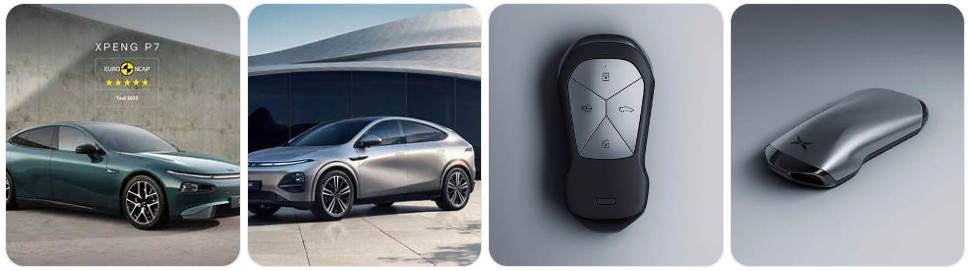
Buy Key Fob Battery Replacement for XPeng
Buying the right XPeng key fob battery replacement starts with matching the original battery size inside your smart key. For many XPeng models, the correct fit is typically a CR2032 3V lithium coin battery, and some XPeng manuals specify CR2032H for the smart key. The safest approach is to open the fob, confirm the battery code printed on the old cell, and then order the same type. If you want to compare options first, you can browse XPeng key fob battery replacements, or go straight to CR2032 replacements for XPeng key fobs and CR2032H battery options if you want to match the battery family more closely.
- CR2032 replacement battery: This is the most important starting point for most XPeng key fob battery swaps. A fresh 3V lithium coin cell is usually all that is needed to restore normal lock, unlock, and proximity performance. Browse CR2032 replacements for XPeng key fobs. Typical price: about $5 to $14 for a multi-pack.
- CR2032H battery options: Some XPeng documentation points specifically to CR2032H, which is a higher-performance variation within the same size family. If you want to match that more closely, compare CR2032H battery options. Typical price: about $6 to $16 depending on pack size and brand.
- Name-brand lithium coin cells: For a vehicle as electronics-heavy as an XPeng, many owners prefer fresh name-brand cells for better storage life and more consistent output. Compare Panasonic CR2032 batteries, Energizer CR2032 batteries, and similar options. Typical price: about $6 to $15.
- XPeng key fob shell and battery kits: If your XPeng remote still works but the casing is cracked, scuffed, or the buttons are wearing out, it can be smart to replace the shell and the battery at the same time. See smart key shell and battery kits. Typical price: about $10 to $25.

Key Fob Battery Replacement for Ford & Lincoln (F150 Explorer Edge Fusion Bronco Escape Mustang Expedition Transit Ranger Maverick EcoSport MK Nautilus Corsair Navigator Lightning) Smart Remote

SHI Key Fob Replacement Batteries - Universal Fit, Compatible with Car Key Fobs for Nissan, Toyota, Honda, Chevy, GMC, Ford, Jeep, Dodge, Ram, Chrysler, Mazda, Subaru, Hyundai, Kia & More

Key Fob Replacement Batteries for Chevy & GMC (Silverado Equinox Malibu Traverse Cruze Sierra Acadia Terrain Colorado Impala Trax Camaro Tahoe Yukon Trailblazer) Remote Key (2-Pack) (Check Fit Guide)
XPeng Key Fob Battery Replacement by Model
- XPeng P7 key fob battery replacement: The P7 smart key is one of the most commonly searched XPeng remotes for battery service, and it is widely associated with the CR2032 battery family. If you want to compare options before opening the fob, browse XPeng P7 key fob battery options.
- XPeng P7+ key fob battery replacement: As with the P7, the safest method is to confirm the code on the original battery inside the remote before ordering. A correct fresh battery usually restores normal remote range quickly.
- XPeng G3 key fob battery replacement: Earlier XPeng owners should still verify the existing battery code before ordering, but many G3 smart keys are also matched with the CR2032 battery family. It helps to keep a spare on hand if the vehicle is used daily.
- XPeng G3i key fob battery replacement: The G3i uses the same general smart-key logic as other modern XPeng models, so a careful battery match and correct positive-side orientation are the most important parts of the swap.
- XPeng P5 key fob battery replacement: A weak battery can show up as inconsistent button response or reduced recognition range. Searching XPeng P5 key fob battery options can help you keep a backup ready.
- XPeng G6 key fob battery replacement: The G6 smart key is a newer-style XPeng fob, and many owners will want to stay with a high-quality CR2032 or CR2032H replacement rather than using the cheapest generic cell available.
- XPeng G9 key fob battery replacement: XPeng documentation for the G9 points to a CR2032H key battery, making it especially important to install the battery with the positive side facing up. If you want to compare before opening the fob, browse XPeng G9 key fob battery options.
- XPeng X9 key fob battery replacement: Because the X9 is part of XPeng’s newer product lineup, it is best to match the original battery exactly and avoid forcing the case if the replacement cell seems thicker than expected.
To choose the right replacement key fob battery for XPeng, start with the battery code already installed in the smart key rather than assuming every XPeng remote uses the exact same cell. In many cases, CR2032 will be the correct family, while some XPeng documentation specifically references CR2032H. That means your best replacement is a fresh 3V lithium coin battery in the same size, from a reputable brand, installed in the same orientation as the original. If your remote housing is also worn, it can help to compare replacement smart key shells at the same time so you only open the fob once.
How to Replace a XPeng Key Fob Battery
- Gather the tools needed. You will need your XPeng key fob, the correct replacement battery, and a small pry tool or flathead screwdriver. Many owners prefer a small flathead screwdriver, a precision screwdriver set, or plastic pry tools to reduce the chance of marking the case.
- Remove the emergency or auxiliary key if your XPeng fob has one. Press the release mechanism and slide the hidden metal key out of the remote. This usually exposes the access point for separating the case.
- Open the fob carefully along the seam. Insert the pry tool or flathead screwdriver into the seam or notch and twist gently. Work slowly around the edge rather than forcing one side open all at once.
- Separate the housing without disturbing the internals. Once the cover loosens, open the case carefully and keep the button pad and internal parts aligned.
- Confirm the old battery type. Look directly at the battery code printed on the old cell. For many XPeng smart keys this will be CR2032, and some documentation may point you to CR2032H. This is the best confirmation before installing the new battery.
- Remove the old battery gently. Lift it out using a fingernail, plastic pry tool, or the edge of the screwdriver. Avoid bending the battery clip or scraping the contact surfaces.
- Install the new battery in the same orientation. Match the old battery position exactly. On XPeng smart keys, pay close attention to the positive (+) side. If the battery goes in upside down, the fob will not communicate correctly.
- Check battery seating and contact pressure. Make sure the battery sits flat and securely under the retaining points. A loose battery can cause intermittent operation even when it is new.
- Snap the fob back together. Align the housing halves, press evenly around the edges until the clips engage, and reinstall the emergency key if equipped.
- Test all XPeng key functions. Try lock, unlock, remote opening features if applicable, and proximity recognition near the vehicle. If the remote still behaves inconsistently, reopen it and check battery orientation, battery size, and contact fit.
Common XPeng Key Fob Problems
- Low key battery warning on the vehicle: This is the most common sign that the XPeng smart key battery is nearing the end of its useful life and should be replaced before range drops further.
- Reduced remote range: If your XPeng only responds when you stand close to the door or window, the battery may be weak even if some button functions still work.
- Intermittent lock and unlock response: A fading coin cell often causes the key to work sometimes and fail at other times, especially in cold weather or after the fob has sat unused.
- XPeng key fob still does not work after a battery change: The most common causes are incorrect battery size, upside-down installation, poor battery contact, or a worn shell that no longer holds components tightly in place.
- Case does not close after battery replacement: This usually means the replacement battery is the wrong thickness or is not seated correctly. Never force the cover shut.
- Buttons feel worn, mushy, or inconsistent: In this case, a fresh battery may help only part of the problem. A replacement shell may be worth considering if the electronics still work.
- Vehicle does not recognize the key reliably: If your XPeng sometimes fails to detect the smart key even with a new battery, inspect the fob for contact damage, loose internal parts, or a worn housing that lets the battery shift.
HIBEYO Key Fob Cover Compatible with Xpeng Xiaopeng P5 P7 G9 G3i Accessories Alloy Key Case&Smooth Leather Key Cover with Keychain Fit for Xiaopeng Key Shell-Long Keychain

Jinhon for Xpeng Suede Leather Key Fob Cover Replacement Fit for Xiaopeng P5 P7 P7I G3 G3i G6 G9 X9 2023 2024 Keychain Key Holder Automative Decoration Accessories 4 Button Black

HIBEYO Key Fob Cover Compatible with Xpeng Xiaopeng P5 P7 G9 G3i Accessories Alloy Key Case&Smooth Leather Key Cover with Keychain Fit for Xiaopeng Key Shell-Square Keychain
Battery Replacement vs New Key Fob for XPeng
For most XPeng owners, a battery replacement should be the first fix to try. It is inexpensive, fast, and often solves the most common smart-key symptoms such as shorter operating range, low-battery alerts, weak button response, or inconsistent vehicle recognition. If the key fob housing is still in good condition and the remote only recently started acting up, a fresh replacement battery is usually the most practical first step.
A new XPeng key fob makes more sense when the remote has broken buttons, water damage, internal board damage, or ongoing communication issues that continue even after installing the correct new battery. If the electronics are fine but the outer case is damaged, a replacement shell may be enough and is usually more affordable than replacing the full smart key. In other words, start with the battery, consider the shell if the case is worn, and only move to a complete new key fob when the remote itself is clearly failing.
XPeng Key Fob FAQ
What battery does a XPeng key fob use?
Many XPeng key fobs use a CR2032-type 3V lithium coin battery, and some XPeng documentation specifically lists CR2032H. The best way to confirm the correct battery is to open the fob and match the code printed on the old battery.
Can I replace a XPeng key fob battery myself?
Yes. In most cases, XPeng key fob battery replacement is a simple DIY task that only takes a few minutes with the right battery and a small pry tool or flathead screwdriver.
How do I know my XPeng key fob battery is dying?
Common signs include reduced operating range, intermittent lock and unlock response, low key battery warnings, and inconsistent vehicle recognition.
Will changing the battery erase my XPeng key fob programming?
No, a normal battery replacement should not erase the key fob programming. If the remote stops working afterward, the problem is more likely related to battery orientation, battery fit, or a separate issue with the remote.
What happens if I install the XPeng key fob battery upside down?
The smart key usually will not work correctly. Always match the original battery orientation and make sure the positive side is installed the same way as the battery you removed.
How long does a XPeng key fob battery last?
Battery life depends on usage, climate, and battery quality, but many smart key batteries last roughly two to four years before showing weaker performance.
Should I buy CR2032 or CR2032H for my XPeng key fob?
Buy the exact battery type shown inside your key fob or listed in your XPeng documentation. If your original battery is marked CR2032H, it is smart to replace it with the same type rather than guessing.
Do I need a new XPeng key fob or just a new battery?
If the key only has weak range, low battery warnings, or delayed response, a new battery is usually enough. If the remote has physical damage, water damage, or still fails after the correct battery is installed, a shell replacement or full new key fob may be necessary.

ACDelco Gold 48AGM (88864541) 36 Month Warranty AGM BCI Group 48 Battery

Renogy 12V 70Ah AGM Car Battery H6, Group 48 Start and Stop Automotive Battery with 720 CCA, 120RC, Reliable Power for Cars, SUVs, Trucks, and Marine Starting
